Aerospike Unreplicated Records After Restart

Aerospike Unreplicated Records After Restart
Recently we faced a issue where huge number of unreplicated records showed up after a regular aerospike maintaince restart.
At first glance this sounds like one of those metrics that can ruin your whole day.
unreplicated records 11.6M
Nice.
Are records missing? Did replication break? Is one node secretly holding the only copy of some data? Should we restart again because that fixes everything bro?
I could not find any high quality blog, or supporting link that explained unreplicated records in a way that made the whole thing click.
That is why I thought of writing this post.
Let me try to create a solid walkthrough.
To understand why unreplicated records show up we need to start at the basics of aerospike,
Aerospike basics
-> in-memory primary index
-> key to partition mapping
-> replication
-> CAP theorem
-> AP mode vs strong consistency
-> roster
-> writes and deletes
-> restart recovery
-> why unreplicated records show up
If that path clicks, the metric stops looking like black magic.
First, what the hell is Aerospike?
Aerospike is a distributed Fast NoSQL database.
The boring line is:
client -> aerospike cluster -> record
But internally, for a normal key lookup, it is more like:
key -> digest -> partition -> primary index -> storage location -> record
Aerospike is mostly used when people want:
- very low latency
- very high throughput
- predictable performance
- large scale key-value access
- data spread across many nodes
- replication without making the app manually copy data everywhere
This is why you see it in places like adtech, fraud systems, profile stores, session stores, recommendation systems, real-time decision systems, and other places where the database cannot sit and think for 2 seconds.
In a nutshell:
Aerospike is a fast distributed record store.
Not SQL joins. Not "scan everything and group by mood".
Mostly:
give key -> get record
write key -> store record
delete key -> remove record
Simple from outside.
Interesting inside.
Namespace, set, record, bin
Before going into internals, these words should be clear.
Namespace
Namespace is the big container.
You can think of it like a database.
Example:
namespace: users
Namespace has important settings like:
- storage engine
- replication factor
- strong consistency or availability mode
- memory limits
- stop writes limits
- roster configuration for strong consistency
If something is wrong at namespace level, it can affect a lot of data.
Set
Set is a logical group inside a namespace.
Example:
namespace: users
set: profile
Do not map this 1:1 to SQL Concepts in your head, but it is some what close enough to understand for a first time.
Record
Record is the actual thing you store.
Example:
key: user:42
bins:
  name = "Prajwal"
  age = 24
  plan = "free"
Bin
Bins are fields inside the record.
So if record is the row-ish thing, bins are the column-ish things.
Again, not exactly SQL, but good enough.
The primary index is the first big idea
This is the part I should have explained earlier.
Aerospike is fast partly because it keeps a primary index in memory.
The primary index does not store your whole record value.
It stores metadata that helps Aerospike find the record quickly.
For a key lookup, think of it like:
digest -> index entry -> where the record lives
The actual record can live in memory or on storage depending on namespace configuration. But the primary index is the fast map Aerospike uses to avoid wandering around blindly.

So when you read a record:
client asks for key
Aerospike hashes key into digest
Aerospike checks primary index
index tells where record is
Aerospike reads record
This is also why restart matters.
If an important part of the live lookup/record state is in memory, restart means Aerospike has to rebuild or recover that view of the world.
This is not just:
aerospike starts -> everything instantly knows everything
No.
The node has to come back, rebuild index/state, talk to the cluster, compare partition ownership, and settle replication truth.
That is where the unreplicated-records confusion starts becoming understandable.
How does Aerospike know which node owns a record?
Aerospike does not randomly throw records at nodes.
When you write a record, Aerospike takes the key and creates a digest from it.
That digest maps to one of the namespace partitions.
Aerospike has exactly 4096 logical partitions per namespace.
key -> digest -> partition
Then the cluster knows which node is master for that partition and which node has the replica copy.
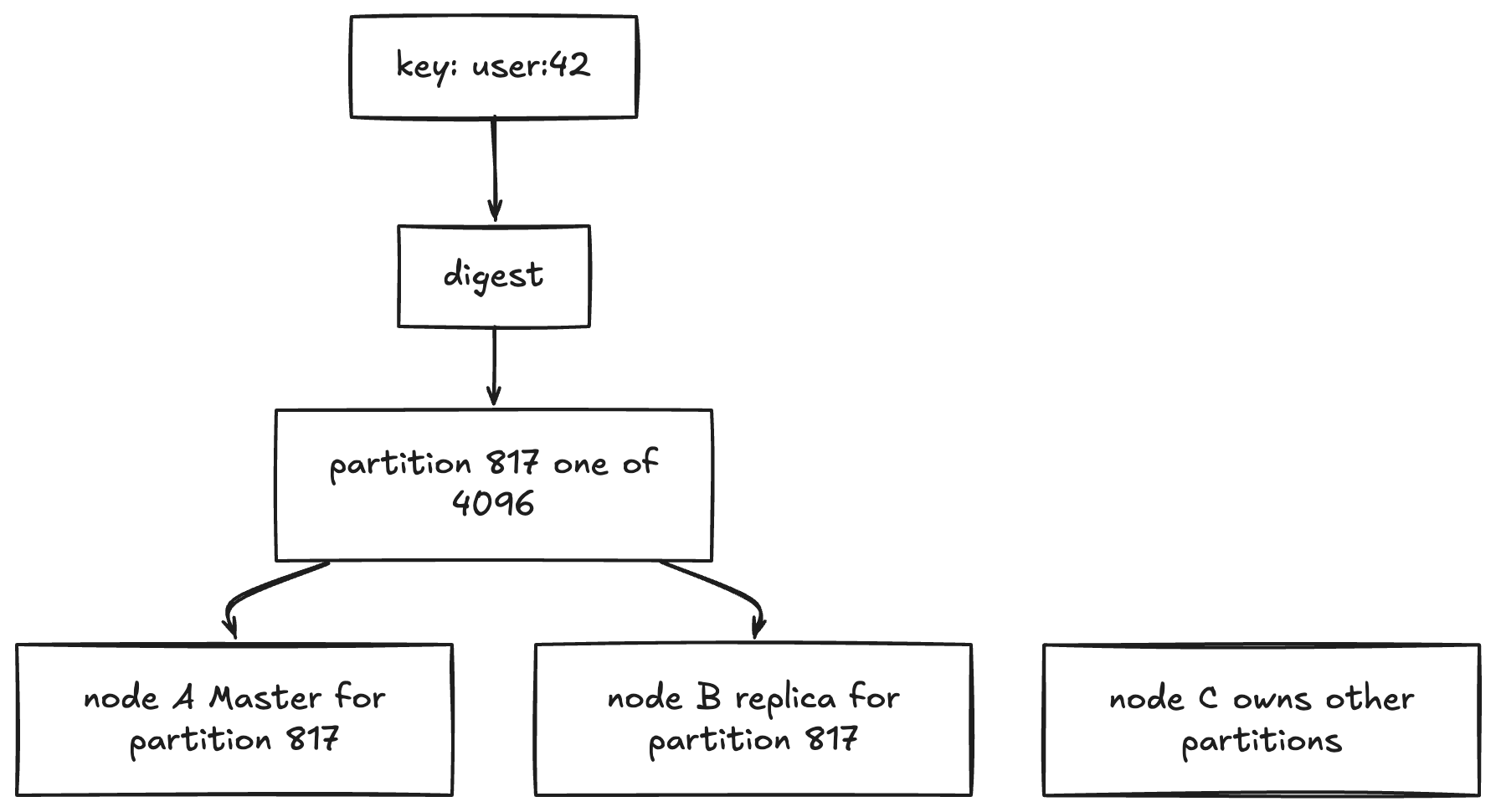
This one thing clears up a lot.
When you say:
record is in Aerospike
it really means:
record key maps to a partition
that partition has ownership
ownership points to some node as master
and some other node as replica
primary index helps locate the actual record quickly
The client does not need to know all this manually. Aerospike clients maintain cluster partition maps and route requests correctly.
But as a human debugging production, you absolutely need clarity.
Are partitions always equally owned?
Ideally, partition ownership is balanced across nodes.
If you have 4 nodes and 4096 partitions, your brain wants to say:
4096 / 4 = 1024 master partitions per node
And in a calm, healthy, settled cluster, that is roughly the kind of balance you expect.
But during restart, node join, node leave, roster change, or migrations, ownership can be temporarily uneven.
One node can own more master partitions than another node for some time.
Example:
node A -> 1400 master partitions
node B -> 900 master partitions
node C -> 896 master partitions
node D -> 900 master partitions
This does not automatically mean data is broken.
It can simply mean:
cluster is still settling partition ownership
Why does this matter?
Because more partition ownership means more responsibility.
If a node temporarily owns more master partitions, it may handle more reads/writes for those partitions, more index/state work, and more replication coordination.
So during restart or migration, do not expect every node to look perfectly equal every second.
The better question is:
is ownership converging to a sane balanced state?
Not:
why is it not perfectly equal right now?
Master, replica and replication factor
Suppose replication factor is 2.
For one partition:
node A = master
node B = replica
The master is the main owner for that partition.
Replica has another copy.
If node A goes away, Aerospike can move ownership so another node becomes master for the partition.
This is the whole point of distribution:
do not keep the only copy of important data on one machine
Because machines die.
Disks die.
Networks fuck up sometimes.
Someone restarts the wrong node at the wrong time because of course.
CAP theorem
Before AP and SC make sense, CAP needs to be clear.
CAP theorem says that when there is a network partition, a distributed system has to choose between:
C = Consistency
A = Availability
P = Partition tolerance
The annoying part is that P is not really optional.
If your system is distributed across machines, network partitions can happen and will definitely happen.
Nodes can stop talking.
Packets can disappear.
Someone can crash into the cables underlaid the ocean :), JK
One side of the cluster may not know what the other side is doing. (Split Brain)
So the only choice during a partition is usually:
do I preserve consistency?
or do I preserve availability?
Consistency means:
everyone sees one correct truth
Availability means:
the system keeps accepting requests
The nightmare case:
node A side accepts write user:42 = plan free
node B side accepts write user:42 = plan pro
network heals
now what is true?
This is why distributed databases have modes and policies.
They are not just being fancy.
They are choosing what to do when reality slaps
AP mode vs SC mode
Aerospike has two broad consistency modes:
AP = availability first
SC = strong consistency first
AP mode is the high-availability mode.
In AP mode, Aerospike tries to keep serving reads and writes as much as possible.
The tradeoff is that during failures or partitions, the system may allow progress and later reconcile.
So AP roughly means:
keep the system available
accept that reconciliation/conflict handling may exist
Strong consistency mode is different.
SC mode says:
if we cannot be sure about the correct value,
we would rather make the partition unavailable
than return or accept bullshit
So SC roughly means:
protect one correct truth
even if some reads/writes must stop temporarily
This is the part people miss.
Strong consistency is not "same as AP but safer for free".
No.
You are choosing a different failure behavior.
AP:
availability first
SC:
correctness first
In CAP:
AP mode leans availability during partition
SC mode leans consistency during partition
This is not Aerospike acting moody.
This is distributed systems being distributed systems.
If two sides of a broken cluster both accept writes for the same record, now you have two truths.
And two truths in a database is how people start writing incident reports.
What is a roster?
Now roster will make more sense.
For a strong consistency namespace, the roster is the list of nodes that are allowed to participate in owning data for that namespace.
Think of it like:
these are the official nodes who can read/serve this namespace
Not every node that exists in the cluster is automatically part of the SC namespace truth.
The roster matters because strong consistency needs to know:
- who is supposed to own partitions
- who is missing
- whether enough copies exist
- whether a partition can safely accept reads and writes
Simple picture:
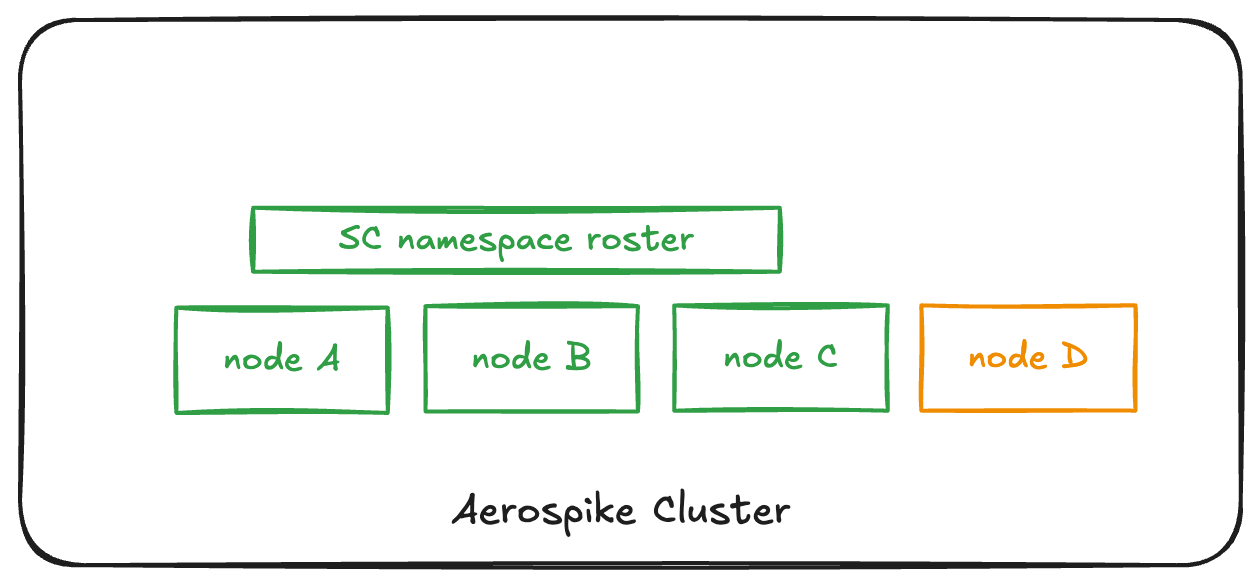
A Cluster can have 4 nodes but out of 4 nodes 3 nodes can participate in a roaster, If roster management is wrong, strong consistency can get conservative and make partitions unavailable.
Because again:
SC would rather stop than guess
How writes happen
Let us say client wants to write:
namespace: users
set: profile
key: user:42
Flow:
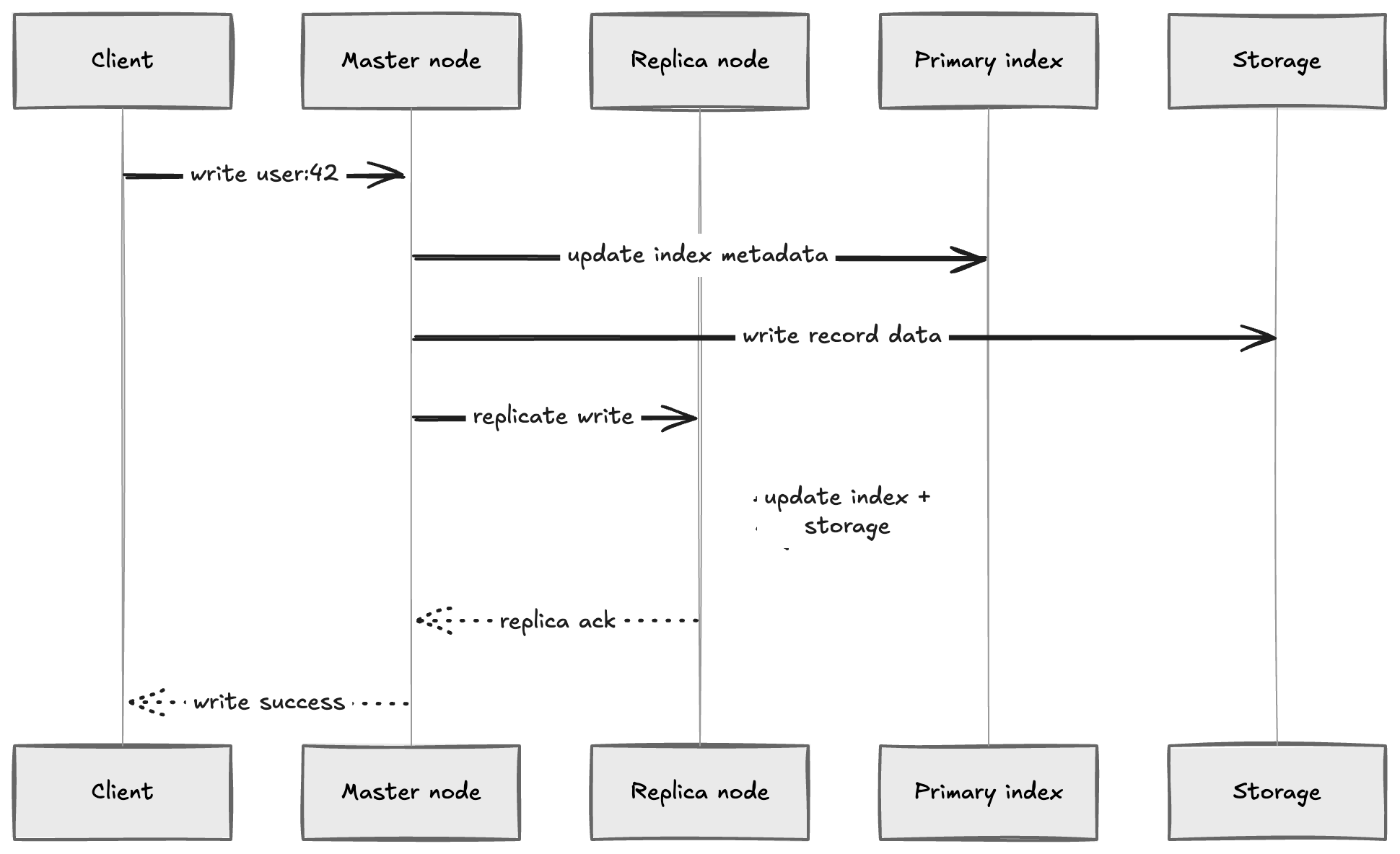
The important idea:
write success should not mean "master wrote and replica will maybe catch up later"
In strong consistency mode especially, replication is not some casual background promise, unlike other databases.
Aerospike is trying to make sure that once a write is accepted, later reads do not see old nonsense because another node had a stale copy.
This is why strong consistency exists.
How deletes happen
Delete is where things get a little annoying.
Because "delete" does not always mean the same thing.
There are two mental models:
normal delete / expunge
durable delete / tombstone
They are not the same.
In the simple non-durable delete case, Aerospike can remove the record from the primary index and forget it.
In human words:
remove primary index entry from memory
record is gone from this node's live view
That is closer to:
remove it and move on
But durable delete is different.
Durable delete is a write of deletion history.
Instead of only saying:
I do not have this record anymore
it says:
this record was deleted
do not let an older copy become alive again
That difference matters when nodes restart, migrate, or come back with old data.
In strong consistency namespaces, expunge behavior also depends on config.
The parameter to know is:
strong-consistency-allow-expunge
If this is enabled for an SC namespace, Aerospike can allow expunge-style deletes.
If you want delete safety across cold starts/recovery, durable deletes and tombstones are the safer mental model.
How?
Imagine replication factor is 2.
node A = master for user:42
node B = replica for user:42
Both nodes have the record:
user:42 -> plan = free
Now node B goes down.
While node B is down, client deletes user:42.
If delete was just an expunge-style "remove it from node A's primary index and storage" operation, node A would remove the record from its live view.
But node B is not online to hear about that delete.
So node B still has the old copy on disk:
user:42 -> plan = free
Later node B comes back.
Now the cluster sees:
node A: I do not have user:42
node B: I have user:42
Without a durable marker saying "this record was deleted", node B's old copy can look like valid data that needs to be repaired or migrated back.
That is how deleted data can come back.
That is nightmare behavior:
delete user:42
restart old node
old copy appears again
No thanks.
So for important replicated data, delete needs to carry intent too.
In Aerospike, durable deletes use tombstones.
Tombstone means:
this record was deleted
do not let an older copy become alive again
So when node B comes back with the old copy, the cluster can compare it against the tombstone and say:
nope, this record was deleted
your old copy does not win
One more thing: tombstones are not meant to sit around forever.
The tombstone is needed for safety, but it still consumes index and storage space.
So Aerospike has a background cleanup mechanism called tomb raider.
The important distinction is:
durable delete writes the tombstone
tomb raider later cleans up tombstones that are no longer needed
Do not mix these two.
Tomb raider is not what makes the delete safe in the first place.
The tombstone makes the delete safe.
Tomb raider is the background worker that eventually removes tombstones when Aerospike decides they are safe to remove.
So the lifecycle is:
record exists
-> client deletes record with durable delete
-> Aerospike writes tombstone
-> tombstone is replicated
-> old copies lose against tombstone during recovery/conflict resolution
-> tomb raider cleans tombstone later
Delete flow:
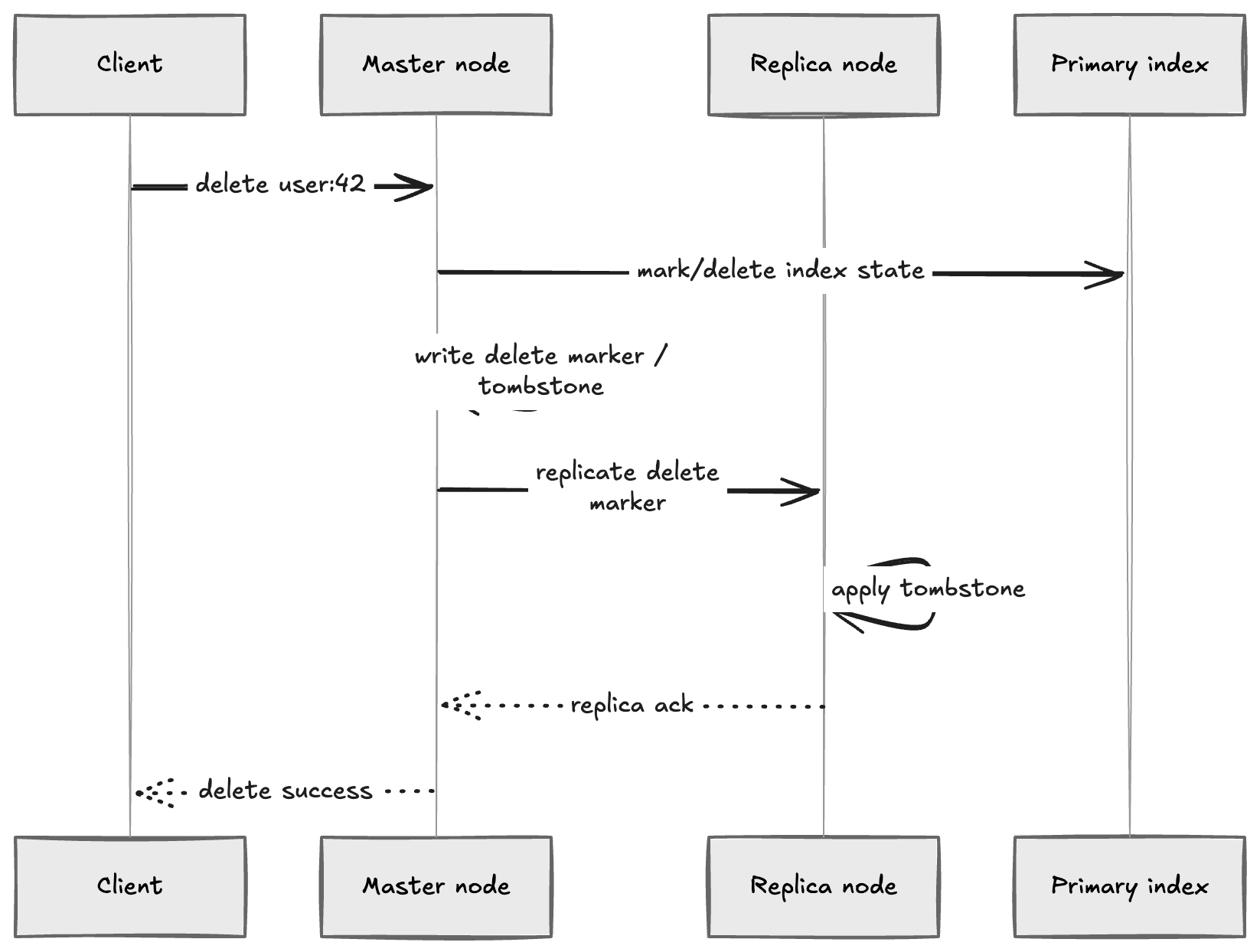
So delete is not just:
rm record
It is:
write the fact that deletion happened
replicate that fact
make sure old copies do not win later
This is why deletes in distributed systems are harder than they look.
What does unreplicated record mean?
Now we can finally talk about the metric.
Unreplicated record means Aerospike currently believes a record does not have the expected replica copy.
In human words:
I have this record,
but I am not confident the required replica exists right now.
This does not always mean:
data is lost
It means:
replication state is not complete for this record at this moment
That distinction matters.
Because if you see unreplicated records during migrations, restarts, or recovery, your first question should not be:
who deleted my data?
Your first question should be:
is the cluster still rebuilding / appealing / re-replicating?
Why restart can create this scary number
This is the main thing.
Before restart, Aerospike has live in-memory state.
It has a primary index.
It has partition state.
It has knowledge about what it believes is replicated, what is not, which partitions are healthy, what has been synced, and all that.
Then you restart a node.
During restart, Aerospike has to rebuild its view of the world from storage and cluster state.
The storage may have record data.
But the node still needs to rebuild/restore the primary index and prove how its partition data fits into the current cluster truth.
The record on disk does not say:
yes bro, I definitely have my matching replica alive and current
and no one wrote a newer version while I was down
and the roster is fine
and ownership is settled
So when the node comes back, some records can temporarily be treated as unreplicated until the cluster finishes the internal recovery work.
Mental model:
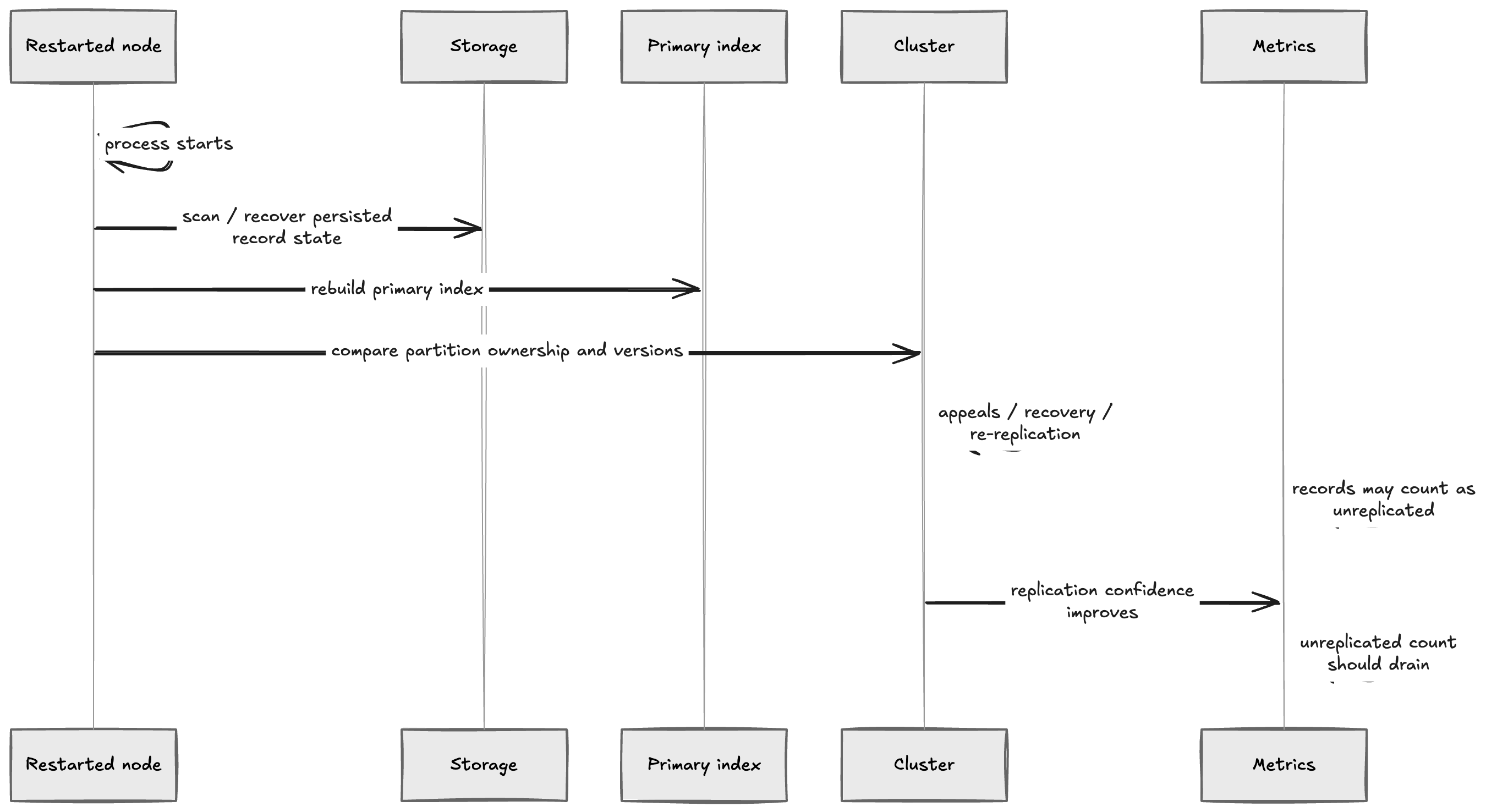
So after restart:
unreplicated records can be a temporary recovery signal
Not automatically:
Aerospike lost replicas forever
This is the part that clicked for me.
The metric is scary because the name sounds final.
But in restart recovery, it can mean:
Aerospike is still proving the replica situation again
Why not just mark everything replicated immediately?
Because that would be stupid.
Imagine node A restarts.
It reads its local storage and finds record user:42.
Can it instantly say the record is safely replicated?
Not really.
It needs to know what happened while it was down:
- did another node get a newer version?
- did the partition ownership change?
- did the replica also restart?
- did the cluster lose a roster node?
- is this partition available, unavailable, or dead?
- is this copy the current truth or an older copy?
In strong consistency mode, guessing is not okay.
So the system behaves conservatively, that is why usually aerospike take longer scanning the data, once scanning is complete migrations happens in seconds.
That conservative behavior is hair pulling when looking at grafana (BIG RED PANEL), but it is exactly why strong consistency is useful.
What are appeals?
Appeals are Aerospike's way of resolving uncertainty around partition state.
When nodes disagree or a node comes back and needs to prove what it has, the cluster does internal coordination to decide what partition state is valid.
You can think of it like:
node: I have data for this partition
cluster: okay, prove how it fits with the current truth
Until that process finishes, some partitions or records may not be fully trusted.
Again:
SC does not guess
It proves.
What about migrations?
Migrations are when Aerospike moves partition data between nodes.
This happens when:
- node joins
- node leaves
- cluster membership changes
- roster changes
- ownership needs rebalancing
Flow:

During this time, metrics can look busy and partition ownership can look uneven.
One node may temporarily own more of the 4096 partitions than another node while the cluster is moving data and settling the partition map.
That does not automatically mean broken.
Broken is when ownership does not converge, migrations do not finish, or the cluster keeps moving the same work around.
Until then, it mostly means the cluster is doing distributed database work.
Distributed database work is just moving bytes plus arguing about truth.
What should you check when unreplicated records show up?
If unreplicated records appear right after a restart, I would not panic immediately.
I would check whether the number is draining.
1. Is the cluster stable?
Check whether all expected nodes are present.
asadm -e "info network"
If nodes are flapping, do not expect clean metrics.
2. Is the namespace healthy?
Look at namespace stats.
asadm -e "show stat namespace for <namespace>"
Things I would care about:
- unavailable partitions
- dead partitions
- migrations remaining
- stop writes
- memory/storage pressure
- unreplicated records
Exact stat names can vary by server version and tooling output, so do not blindly copy one dashboard label from a random blog post, including this one.
Use your version's Aerospike docs and asadm output.
3. Are migrations running?
asadm -e "show stat like migrate"
If migrations are active, the cluster may still be moving partition copies around.
4. Is the roster correct?
For strong consistency namespaces, roster is not optional trivia.
If the roster is wrong, missing nodes can make partitions unavailable or block recovery.
Check the namespace roster and compare it with what you actually expect.
5. Is the number going down?
This is the big one.
If unreplicated records appear after restart and then steadily drain:
probably recovery doing recovery things
If the number stays stuck or grows:
now investigate properly
Stuck unreplicated records can mean replication is blocked, a node is missing, migrations are not completing, storage pressure exists, or the cluster cannot prove partition state.
When should you worry?
I would worry when:
- unreplicated records do not drain
- unavailable partitions are non-zero
- dead partitions show up
- migrations are stuck
- roster nodes are missing
- stop writes is active
- a node keeps restarting
- storage is full or near full
- clients are seeing read/write errors
Metric alone is not the whole story.
Context matters.
After restart:
unreplicated records for a short time = maybe normal
But:
unreplicated records stuck forever + unavailable partitions + missing node = not normal
The important restart mental model
Before restart:
primary index is in memory
cluster has live partition and replication state
During restart:
node disappears
cluster ownership may change
After restart:
node comes back
primary index is rebuilt/restored
partition state is compared
records may temporarily count as unreplicated
appeals/recovery/migrations settle state
metric should drain
In one line:
unreplicated after restart often means "replication confidence is being rebuilt"
Not:
your data is definitely gone
Why Aerospike is fast but still complicated
Aerospike is fast because it is designed around predictable key access, partitioning, memory-resident indexing, efficient storage access, and distributing data across nodes.
But distributed databases do not become simple just because they are fast.
They still need to answer hard questions:
- where is this record?
- which partition owns it?
- which node is master?
- where is the replica?
- which copy is latest?
- what if the master dies?
- what if the replica is behind?
- what if a node restarts with old data?
- what if two sides of the cluster disagree?
- what if a delete meets an old copy?
The user sees:
put(key, value)
get(key)
delete(key)
The database sees:
primary index
hashing
partition ownership
replication
CAP tradeoffs
roster
migrations
appeals
tombstones
availability decisions
This is why metrics like unreplicated records exist.
They are not there to make dashboards ugly.
They expose the hidden distributed systems work.
Closing Thoughts
Aerospike:
fast distributed key-value / record database
Primary index:
in-memory map from digest to record metadata/location
Partition:
one of 4096 logical buckets per namespace
Master:
node currently owning writes for a partition
Replica:
another copy of partition data
CAP:
when network partition happens,
choose consistency or availability behavior
AP mode:
availability first
Strong consistency:
correctness first, even if some partitions stop temporarily
Roster:
official node list for a strong consistency namespace
Unreplicated record:
record whose expected replica state is not complete/trusted right now
After restart:
records can temporarily look unreplicated
while Aerospike rebuilds index/state and proves replication state
Deletes:
normal delete can expunge the record,
durable delete writes a tombstone,
and tombstones stop old copies coming back from the dead
CRUD is easy. Maintaining a database will make you look 35 when you are 25.